Alexa is the voice layer in Amazon's house: speakers, displays, Fire TV in some setups, and a large pile of third-party devices that connect through skills, built-in radios, or Matter. The useful 2026 question is which Alexa you actually have turned on, because Amazon now sells more than one way to reach the assistant.
This page is a research guide. We did not live with an Alexa+ household for this update. For a wider first-device plan, use the starter guide. For the other assistants, use Google Home and Apple Home. For radios and hubs, use the protocols guide. The article index of older Alexa posts is still at /alexa/.
Which Alexa are you actually using?
Read Amazon's tiers as product boundaries, not as marketing adjectives. The About Amazon article "Alexa+ now available to everyone in the US—and free for Prime members," updated September 1, 2026, says:
- Prime members in the U.S. get unlimited full Alexa+ for the household on Alexa-enabled devices, on Alexa.com, and in the Alexa app, at no additional cost.
- People without Prime can subscribe to that full experience. Amazon states the price as $19.99 per month. That figure is Amazon's published price in that article, not a price we re-checked at a retailer.
- Everyone, including people without Prime, can use a free text chat at Alexa.com and in the Alexa app. Amazon says access to that free experience is limited based on use.
Do not describe the free chat as "Alexa+ on the Echo." Amazon presents it as a text experience for answers, planning, and research. Device control, routines, and the household voice experience are part of the full tier. If a feature matters, confirm it on the device you own after the account is upgraded, not from a screenshot of the chat.
Amazon also notes that usage must follow its policies and that additional subscriptions are required for some Ring features. A Prime membership does not, by that sentence, include every Ring cloud feature. Check Ring's own plan list before you buy a camera to "work with Alexa."
Availability in the page we checked is the United States. Do not assume the same Prime inclusion, the same price, or the same chat tier in another country. If you are outside the U.S., the Alexa app's upgrade screen is the source of truth, not this summary.
What to set up first
| You want | Start with | Leave for later | Watch-out |
|---|---|---|---|
| Lights by voice | One lamp on a Wi-Fi plug or bulb already linked to the Alexa app | A whole-home Zigbee system | The lamp's wall switch still has to stay on for a smart bulb |
| A routine when you leave | One "away" routine that turns off a known set of lights | A routine that also unlocks a door | An unlock routine needs a second factor you are willing to live with |
| Music in one room | The speaker you already have, on the music service you already pay for | A multi-room group across brands | Group playback depends on the speaker generation and the music plan |
| A camera on an Echo Show | The camera's account linked inside Alexa, after you understand its storage plan | Person alerts you have not confirmed are included | Amazon says some Ring features need an extra subscription |
| Matter lights alongside another app | One Matter bulb paired to Alexa and, if you need it, a second admin | Assuming every Matter device type is in the Alexa app | Controllers implement Matter features on their own schedule |
| Privacy cleanup | A review of voice-history settings and which skills have account access | Buying another microphone | History controls are per account, and household members can have their own voice profiles |
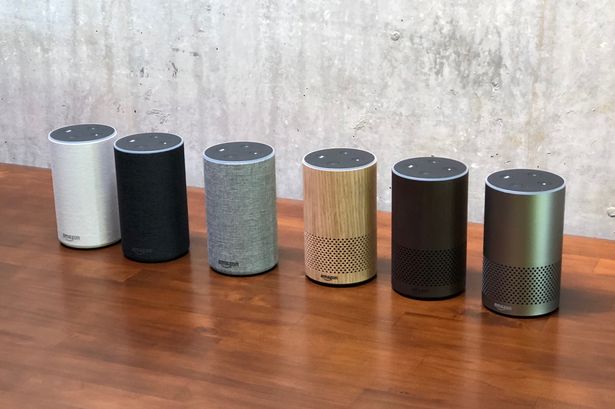
The photo at the top is a 2nd-generation Echo from this site's archive. Echo hardware generations differ in microphones, Zigbee or Thread radios, and which display features exist. A skill or a routine written for "an Echo" may not behave the same on an Echo Dot, an Echo Show, and a third-party speaker with Alexa built in. Match the manual to the model printed on the device.
Compatibility and limits
Alexa can see devices through several doors.
- A skill or account link. The maker's cloud tells Alexa what the device can do. If the maker's service is down, voice often fails even though the device is powered.
- A built-in radio. Some Echo models have included a Zigbee coordinator, and some later models include Thread hardware. Whether the model in your room still exposes that radio is a current spec question. Our older article on connecting Zigbee gadgets to an Echo describes the steps as they stood then. Re-check them against the Alexa app before you buy a bag of Zigbee sensors.
- Matter. A Matter device is commissioned into a fabric. Alexa can be one admin. Another platform can be a second admin when both sides support multi-admin for that device. That is the feature people mean when they say a Matter bulb can live in two apps. It is not automatic for every device type, and it is not a way to merge two old proprietary accounts.
- Fire TV and Echo speakers as targets. Telling Alexa to play something is not the same as telling a television from another brand to join an Echo speaker group. Confirm the device is an Alexa target, not merely "has a microphone."
Routines are Alexa's automation list: a trigger (time, voice phrase, sensor, or location, depending on what your devices expose) and a set of actions. A routine is only as reliable as the least reliable action. If one cloud skill times out, the rest of the routine may still run or may stop. Amazon's app shows the last run. Use that, rather than adding a second copy of the same routine, when something misfires.
Skills are optional voice apps. Each skill is an account permission. Remove skills you do not recognize. A skill that can shop or that can access a calendar deserves more scrutiny than a skill that tells a joke.
Alexa+ changes how some requests are answered. It does not change electrical wiring, and it does not make a device local-only. If you need a light to work with the internet router unplugged, you need a device and a controller that both claim local control. Test it once, on purpose, before you depend on it.
Setup, and what fails
- Update the Alexa app and the speaker before you add devices. A half-updated speaker is a common source of "the app sees it, the speaker does not."
- Decide which Amazon account is the household account. Devices follow the account that set them up.
- In the app, turn on the voice-history controls you actually want. The older article How to erase your recordings from Alexa-enabled gadgets shows the idea. The menus have moved since 2023. Use the article as a map, then follow the labels in the current app.
- Add one device. Name it for the room.
- Say the command you really use, not the command in the advertisement. If the speaker answers in the app's history but does the wrong thing, the device name is ambiguous. "Lamp" and "lamp" in two rooms will collide.
- Build one routine. Run it with the phone in another room so you can see the delay.
When Alexa is "unresponsive," separate the cases. Our older note What to do if Alexa is unresponsive is the right kind of checklist: power, network, mute, and a restart. Add these 2026-specific checks.
- Is the account on the free chat tier, and are you expecting device features that Amazon places in the full tier?
- Is the speaker muted, or is the microphone off in a drop-in or privacy setting?
- Did a router change push the speaker onto a band or a guest network it cannot use?
- Is the failure only in one skill? Remove and re-link that skill before you reset the speaker.
- After a reset, devices that were paired to a built-in Zigbee radio may need to be paired again. A factory reset is not free.
Do not reset a speaker that is also your only Zigbee coordinator until you have a plan for the bulbs that depend on it.
What it costs to own
Again, street prices move. The only dollar figure in this guide that comes from a primary source is Amazon's stated $19.99 per month for Alexa+ without Prime, in the U.S. article cited above. We are not reporting a sale price for any Echo model.
The ownership questions that matter:
- Prime versus the subscription versus the chat. If you already pay for Prime in the U.S., Amazon says full Alexa+ is included. If you do not, decide whether you need device features or only the limited chat.
- Music, video, and photo services. Alexa can front services that have their own plans. A speaker does not include a music catalog unless the plan you already have says so.
- Cameras and doorbells. Ring and other brands split live view, recording, and richer alerts across plans. Amazon's Alexa+ article explicitly points at additional Ring subscriptions.
- Skills that bill you. Shopping skills and third-party account links can place orders. Turn off voice purchasing if you do not want a spoken order to go through.
- Electricity. A speaker's standby draw is real and usually small next to heating and cooling. Measure it if you care. Do not accept a blog's percentage savings without your own meter and your own tariff. See the energy guide.
An older "best Alexa devices" article on this site, including The Best Smart Home Devices That Amazon Can Offer and Amazon Alexa Skills, reflects the catalog and the skill store of the year it was written. Use it to see what categories exist. Do not use its order as a current ranking.
Privacy, security, and a manual fallback
Alexa is a microphone in a shared room, plus a history of what was said.
- Review voice history and delete what you do not want kept. Know that deletion steps in a 2023 article may not match today's labels.
- Give each regular user a voice profile if you use personal results, so calendars and shopping do not all land on one person.
- Household profiles are not a lock. Someone who can speak in the room can trigger routines that are not tied to a voice profile. Do not put an unlock, a garage door, or a purchase behind a phrase alone unless you accept that.
- Skills are permissions. Audit them the way you audit phone apps.
- Two-factor authentication on the Amazon account matters more than a clever speaker placement. The account is the key.
Manual fallback:
- Lights still need a switch or a bulb you can operate when the skill is down.
- A drop-in or an announcement feature is optional. Turn it off in rooms where surprise audio is a problem.
- If the only way to silence an alarm or a routine is the app, keep the phone charged and keep one routine you can cancel by voice and by a physical button.
- Unplug the speaker if you need a hard mute. A software mute is a setting. Power is a setting you can see.
How to read the older articles
Everything in the directory below was already published here. The writing was left unchanged. Several of those posts give useful troubleshooting shape — unresponsive speakers, Echo Dot issues, erasing recordings, skills, lighting with Alexa. Their screenshots, device generations, and "best" language are from the year on the byline.
Where an old sentence describes Alexa as a single product with no chat tier and no Prime inclusion, prefer Amazon's September 1, 2026 update for the U.S. access model. The old post can still be right about how a routine is structured.
Frequently asked questions
Is Alexa+ free?
Amazon says that in the U.S. it is included for Prime members, sold as a $19.99 monthly subscription without Prime, and partly available as a free text chat that is limited by use. The free chat is not the same as full Alexa+ on Echo devices. This is Amazon's published description as updated September 1, 2026, not a price we measured in a store.
Do I need a new Echo speaker for Alexa+?
Amazon's page describes full Alexa+ on Alexa-enabled devices generally, not on one new model only. Radios, displays, and which routines a speaker can run still depend on the hardware. Check the model you have. The photo on this page is an older Echo generation and is not evidence about current hardware.
Will my Zigbee devices still pair to an Echo?
Only if that Echo model still includes a Zigbee coordinator and the app still exposes pairing. Read the current spec for your model. An older how-to on this site is a historical procedure, not a promise about every Echo sold since.
Can Alexa control a Matter device that is also in Google Home or Apple Home?
Often for basic controls, when the device supports multi-admin and each platform implements that device type. It is not true for every feature, and it is not a way to import a proprietary cloud account into another app. Pair one device and look at the controls you actually get.
What should I do when Alexa stops answering?
Check mute, power, and Wi-Fi first, then whether the account's Alexa+ tier includes the feature you are trying to use. Reset the speaker only after you know which other devices depend on it. The older unresponsive-Alexa article is a reasonable checklist if you re-check every menu name.
Does this guide rank Echo speakers?
No. We did not test current Echo models for this page, and we are not publishing a rating or a price table.
Sources
Checked November 10, 2026.
- Amazon, updated September 1, 2026, Alexa+ tiers for the U.S., including Prime inclusion, the $19.99 monthly option, the limited free chat, and a note that some Ring features need an additional subscription: Alexa+ now available to everyone in the US.
- Connectivity Standards Alliance on Matter 1.6 (June 17, 2026) and the statement that product timelines vary: Matter 1.6 announcement.
- Alliance specification downloads, which on November 10, 2026 listed Matter 1.6.1 documents as well as 1.6 and 1.5.1: specification download request.
- Thread Group on Matter versus Thread: Thread with Matter.
- This site's older Alexa library, unchanged, indexed at /alexa/.
Articles already on this site
These pages were already on Smart Homes Reviews before this guide. They keep their original wording. Read them as a library of earlier articles, not as new tests or a current ranking.
Posts in this topic
- Amazon Alexa Skills: The Best, Newest & Latest Alexa Skills of 2017
- Amazon Echo 2nd Generation Review: Sound Quality Audio Update
- Amazon Echo vs Google Home: Which should you buy?
- Amazon Echo VS Google Home 2020. Which Should You Buy?
- Amazon Hacked: What Risks Could Alexa Do?
- Benefits and Drawbacks of Amazon Echo Show 15
- Can Alexa Find Your Phone if Ever It Goes Missing?
- Can You Open Skype on Amazon Echo?
- Cheap And Best Alexa Devices This 2021
- Controlling Smart Home Gadgets With Alexa
- How Can Alexa Make Your Entire Home Automated?
- How to Erase Your Recordings from Alexa-enabled Gadgets?
- Simple Ways to Solve Common Amazon Echo Dot Issues
- The Best Smart Home Devices That Amazon Can Offer
- What are the Best Skills That Alexa Can Offer?
- What Does Alexa Hack Do To An Echo User’s Smart Home Network?
- What to Do if Alexa is Unresponsive?
- Why Did Amazon Drop Echo Dot’s Price to $28?